


Standardize IT Infrastructure Across Multiple Locations
When every site is set up a little differently, support gets harder fast. One warehouse may use different cable labels, another may have a different switch layout, and a third may handle access control or wireless upgrades in its own way. It’s clear that efforts to standardize IT infrastructure across multiple warehouse or plant locations what we call multi-site IT standardization can help avoid these issues. Over time, those differences create confusion, slow down troubleshooting, and make expansions more expensive than they should be.
This guide explains how to approach multi-site IT standardization across warehouse and plant locations. Put differently, it infrastructure across multiple locations should follow one clear playbook so teams can standardize it infrastructure without reinventing the process at every site. It is meant for IT managers, infrastructure managers, IT directors, and operations or facilities teams who want cleaner installs, better documentation, and more consistent results across sites.
It also shows how standardization connects to structured cabling, network deployments, access control, and onsite IT support, and why a responsive field services partner can help keep internal teams and existing vendors from becoming bottlenecks.
If you are looking at the bigger picture of operational slowdowns and inconsistent onsite support, this post also builds on our pillar article about removing IT bottlenecks with quick IT field services.
Why multi-site IT standardization matters
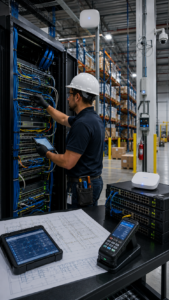 In manufacturing, transportation and logistics, and warehousing and distribution, physical IT infrastructure supports daily operations. Wireless access points, switches, cameras, badge readers, scanners, workstations, and production equipment all depend on the network being installed and supported the right way.
When each site is built differently, internal IT teams lose time just figuring out what they are walking into. A simple switch replacement takes longer when port naming is inconsistent. A wireless issue is harder to solve when access point placement changes from site to site with no clear documentation. A new access control install can get delayed when cable pathways and power needs are not planned the same way from one facility to the next.
Standardization helps solve those problems. It gives your team a repeatable way to install, label, document, and support infrastructure. That makes future work easier, faster, and more predictable.
Start with a clear infrastructure standard
Standardization does not start with equipment. It starts with a standard your team can follow at every location.
That standard should cover how racks are organized, how ports are named, how cables are labeled, and how documentation is stored. It should also cover hardware choices, acceptable install methods, and testing requirements before work is signed off. If one site follows a completely different process than another, the standard is not doing its job.
A strong standard should include naming rules for devices and drops, patch panel layouts, switch stack layouts, wireless access point placement guidelines, and documentation rules for every completed change. It should also define what an acceptable closeout package looks like, including photos, as-built documentation, test results, and notes on any exceptions.
This is where structured cabling becomes a major part of standardization. If your cabling is not installed and labeled the same way across sites, your support burden grows right away.
Standardize cabling before the next expansion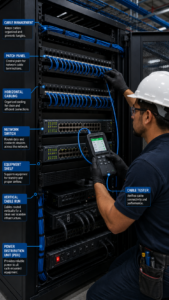
Structured cabling is one of the foundations of successful multi-site IT standardization. A lot of multi-site problems start with cabling. One plant may have clean labels and updated records. Another may have old runs with missing tags, mixed patching, and no clear documentation. That makes every move, add, or change harder than it needs to be.
To fix that, start by setting a structured cabling standard that applies across all locations. Decide how cable drops will be labeled, how patch panels will be organized, and how testing will be documented. Make sure the same standards apply to data drops, wireless access point runs, cameras, and access control devices.
If you are planning expansions or retrofits, include cabling in the project early. Review current pathways, available rack space, PoE requirements, and spare capacity before work starts. A site that looks fine today may not be ready for a wireless expansion, new scanning stations, or additional badge readers tomorrow.
Our guide on Structured Cabling Best Practices for Industrial Operations goes deeper into how cleaner installs and better documentation support long-term growth.
Use repeatable network deployment methods
Repeatable network deployments are another core part of multi-site IT standardization. Once cabling standards are in place, the next step is to standardize your network deployments. This includes how switches are installed, how ports are configured, how wireless access points are mounted, and how changes are documented.
A repeatable deployment method should cover the full process, from staging to validation. That means using standard bills of materials, pre-staged kits where possible, and consistent installation checklists. It also means validating work before handoff, not after problems show up in production.
For example, one warehouse might install access points above rack height with one antenna type, while another uses different mounts and orientation without documentation. Even if the hardware is similar, wireless performance may not be. A more consistent deployment process helps avoid those kinds of issues.
Our article on Warehouse Wireless Design, From Site Survey to Validation explains why standardizing wireless design, placement, and validation is so important in warehouse environments.
Do not let access control become a separate silo
At many facilities, access control ends up being handled as a separate project. One vendor installs readers, another handles cabling, and internal IT is left sorting out the network side later. That usually leads to delays, missed details, and inconsistent results from site to site.
A better approach is to include access control in the same infrastructure standard as the rest of the environment. Readers, cameras, door controllers, and related devices still need structured cabling, power planning, network segmentation, and documentation. If your access control setup changes from site to site without a clear standard, support becomes harder and expansion projects take longer.
Standardization here should cover device naming, cable labeling, mounting guidelines, documentation, and testing. It should also define how access control systems connect to the rest of the network and who owns each part of the process.
That kind of coordination matters even more when you are working across multiple plants or warehouses. One standard keeps everyone aligned, including internal IT, operations, facilities, and outside vendors.
Build a documentation process your team will actually use
Good documentation is one of the biggest benefits of a standardized environment. It is also one of the first things to slip when teams get busy. That is why the process has to be simple and repeatable.
Every site should have the same basic documentation set: labeled patch panels, updated rack layouts, device inventories, floor plans for wireless and security devices, and as-built records for completed work. Photos should be included where helpful, especially for racks, access point placement, and cable pathways. Test results should be saved in the same format across all sites.
The key is to make documentation part of the work, not something that gets added later if there is time. A responsive field services partner can help by making closeout standards part of every project. That way, your internal team is not chasing records after the fact.
Support internal IT with onsite execution
Standardization does not mean your internal team has to do every onsite task themselves. In fact, for companies with 100 to 500 employees, it often makes more sense to use a responsive infrastructure partner for physical installs, upgrades, and field support.
That is where onsite IT support becomes valuable. A good onsite team can follow your standards, document their work, and handle the physical side of infrastructure changes without creating more work for internal IT. That includes structured cabling, switch installs, wireless hardware changes, access control work, and troubleshooting across sites.
If you are evaluating what that kind of support should look like, our blog on IT Field Services Partner for Manufacturing and Logistics outlines what to look for in a vendor and how to spot the signs of a strong partner.
Use standardization to reduce downtime and speed support
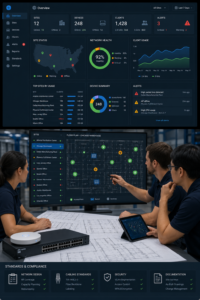
The biggest benefit of standardization is not that everything looks cleaner. It is that your team can move faster when something needs attention.
When a site loses connectivity, a standard rack layout and clear cabling labels help shorten the time it takes to diagnose the issue. A new production line that needs network drops is easier to support when the team can follow a repeatable process without slowing down other work. Wireless problems that affect scanners at one warehouse are also easier to compare across sites when placement and validation data are clearly documented.
This is one reason standardization directly supports uptime. Standardization removes guesswork, helps internal teams troubleshoot faster, and gives field teams a clear model to follow. It also lowers the chance that small differences between sites turn into bigger support problems later.
Our post on 5 Ways Responsive IT Field Services Cut Factory Downtime shows how speed, consistency, and better field execution all connect back to operational uptime.
A useful example of multi-site IT standardization
A good example of multi-site IT standardization comes from Coca-Cola’s enterprise manufacturing standardization initiative. The company was trying to reduce complexity and improve visibility across more than 70 production facilities, each with different systems and data structures. By standardizing control architectures and updating its line information systems, Coca-Cola created a more unified infrastructure that made centralized data management and consistent KPI tracking possible across plants.
The result was better efficiency, stronger decision-making, and less downtime. It is a strong example of how standardizing across multiple sites can create more consistency, make support easier, and give teams a clearer view of performance across the business.
Final thoughts
Standardizing IT infrastructure across multiple warehouse or plant locations is not just about control. It is about making support easier, reducing delays, and building an environment that can grow without becoming harder to manage.
If you are working to standardize infrastructure across locations, contact us. We would be glad to talk through your goals : contact our team.
Author and credentials
By Granado Technologies Team
Granado Technologies delivers onsite IT support, structured cabling, network deployments, and access control for manufacturing, warehousing, and logistics sites. Our team includes certified network engineers and field technicians with experience in single-site and multi-site rollouts.
Continue reading
 IT Infrastructure
 Industrial Security Camera Planning for Effective Coverage
Industrial Security Camera Planning for Effective Coverage Industrial security camera planning helps warehouses, logistics centers, and other industrial facilities improve visibility across fast-moving operations. Employees, forklifts, trucks, inventory,…
 IT Infrastructure
 Wireless Coverage Problems: Causes and Solutions
Wireless Coverage Problems: Causes and Solutions Wireless coverage problems can significantly disrupt industrial operations, even when they begin as minor connectivity issues. Warehouses, manufacturing facilities, distribution centers, and…
 IT Infrastructure
 Medical Office Renovation IT Infrastructure for Growth
Medical Office Renovation IT Infrastructure for Growth Medical office renovation IT infrastructure planning is essential for dental, medical, and other small healthcare practices that are expanding or remodeling.…
Need expert IT, networking, or low-voltage support?
Our team designs, deploys, and supports IT, structured cabling, Wi-Fi, security cameras, and audio-visual systems for businesses across all 50 states — backed by 24/7/365 service and BICSI-certified installers.