

How to Standardize Network Upgrades Across Multiple Locations
Multi-site network upgrade planning helps retail and distributed organizations replace one-off dispatches with a repeatable process. When locations use different switches, labels, equipment layouts, and closeout documents, routine upgrades become harder to schedule and support.
Clear standards control quality without treating every site as identical. Define what stays consistent, document local differences, and give technicians clear requirements from arrival through approval.
This approach supports switch replacements, wireless refreshes, circuit activations, SD-WAN deployments, and other network infrastructure projects. Internal IT can use a primary or secondary onsite partner without losing visibility.
1. Why Standardization Matters Across Multiple Locations
Small inconsistencies become expensive across a portfolio. One store may use a different switch, another may have unlabeled cables, and a third may not document which ports support critical devices.
These differences increase troubleshooting time and weaken remote support. Technicians may need to trace cables or identify unfamiliar hardware before starting. Weak closeout practices force the next visit to repeat that discovery.
Approved equipment, labeling, testing, photos, escalation paths, and documentation give everyone the same definition of complete. Local exceptions remain, but they become visible before a cutover.
2. Multi-Site Network Upgrade Planning Starts With a Baseline
Multi-site network upgrade planning should begin with a reliable site baseline. Before equipment ships or a technician is scheduled, document the current environment and any conditions that could change the scope.
The baseline should include:
- Rack or cabinet type, size, condition, and available space
- ISP handoff, modem, firewall, switches, and uplinks
- Wireless access points, coverage concerns, and controller details
- UPS capacity, available outlets, and power condition
- Open switch ports, PoE availability, and patch-panel assignments
- Copper and fiber pathways, distance limits, and access restrictions
- Known outages, temporary fixes, unsupported hardware, or recurring issues
Photos and a simple network diagram make the baseline easier to review. A survey may reveal that the standard requires cabling, power, or rack work. Finding that early protects the schedule and allows IT to approve prerequisites.
The baseline record should name its source and review date. A site survey, carrier record, drawing, and technician note do not have the same level of confidence. Mark unverified information, assign an owner for open questions, and refresh the baseline after each completed project so it stays useful.
3. Define an Approved Equipment Standard
An approved equipment list reduces unnecessary variation across switches, access points, firewalls, cellular devices, UPS units, patch panels, racks, mounting hardware, optics, and spares.
Define exact models or approved alternatives, firmware, licensing, configuration templates, mounting needs, and replacement procedures. Identify what corporate IT, the onsite vendor, the carrier, or another partner supplies.
Compatibility matters as much as availability. A substitute switch may have enough ports but lack the expected PoE budget, management features, or uplink type. A different UPS may not fit the rack. Clear substitution and change-control rules prevent a local purchasing decision from creating a long-term support problem.
When justified, keep spares for common failure points. Document storage, authorization, and replenishment.
4. Create Repeatable Cabling and Labeling Rules
Consistent structured data cabling makes network upgrades easier to install, verify, and support. Define the approved cable category, jacket rating, fiber type, connector standard, patch-panel layout, pathway method, bend-radius requirements, and testing level.
Color conventions should have a clear purpose. For example, separate colors may identify WAN connections, access points, cameras, voice devices, management links, or general data. The same colors should mean the same thing at every location.
Labels should connect the endpoint, cable, patch-panel port, switch port, and documentation. Use a readable format covering site, room, rack, panel, port, and device instead of informal names.
Require test results for new or remediated cabling, including any approved exception. This turns the physical layer into a known part of the environment.
5. Use One Site-Survey Checklist
A consistent survey checklist closes the gap between a central design and real site conditions. It should confirm building access, required escorts, local contacts, ceiling type, cable pathways, lift or ladder needs, working hours, staging space, loading instructions, and cleanup requirements.
Also identify safety rules, restricted areas, badging, parking, delivery procedures, and permitted work hours. Define how to escalate missing access or a layout that conflicts with the plan.
Use the same photo angles at every site, including the rack, ISP handoff, power, patch panels, pathways, and device locations. Consistent evidence supports faster remote review.
Survey results should separate confirmed conditions from assumptions and open items. For example, a visible cable pathway may appear usable but still require ceiling access approval or distance validation. This distinction helps the rollout team price and schedule work accurately.
6. Coordinate Shipping and Installation Logistics
In multi-site network upgrade planning, shipping is part of the technical plan. Kit, label, and track equipment by site against the approved bill of materials. Include small components that could stop installation.
Before work begins, verify packages against the inventory list and photograph damaged or missing items. Capture serial numbers and asset tags before rack installation.
Define who approves substitutions, added materials, rescheduling, or scope changes. Change control lets the technician pause, document the condition, and receive direction. List contacts for project management, engineering, the carrier, local operations, and after-hours support.
7. Standardize Installation, Cutover, and Validation
Every upgrade should follow the same sequence. Begin with check-in, photos, inventory, configuration confirmation, backups, and a service-state check. Confirm remote support is ready before disconnecting production equipment.
Follow the approved rack layout, power assignments, patching plan, cable management, and device names. Record every difference between the design and site.
Test more than link lights. Validate internet and internal connectivity, VLAN access, PoE devices, wireless service, critical applications, and monitoring. Confirm failover and restoration where required. Ask an authorized user to test priority business functions.
Define rollback triggers, timing, approval, and how to restore the original configuration. Technicians then have a controlled response when the cutover cannot be completed safely.
Schedule cutovers around business-critical periods and define a communication cadence for the work window. The technician, remote engineer, project manager, and local contact should know when progress updates are due, what evidence is required before approval, and who can authorize departure from the site.
8. Require a Complete Closeout Package
A project is not complete when the new device powers on. The closeout package should give internal IT enough information to support the site without another discovery visit.
Require labeled photos, cable tests, models, serial numbers, asset tags, port maps, configuration notes, firmware, exceptions, and onsite approval. Include circuit details, failover results, equipment disposition, and follow-up.
Use one folder structure, filename format, and review checklist. Confirm completeness before closing the location so missing work can still be corrected.
9. Project Example: Network Equipment Installation and Rack Organization
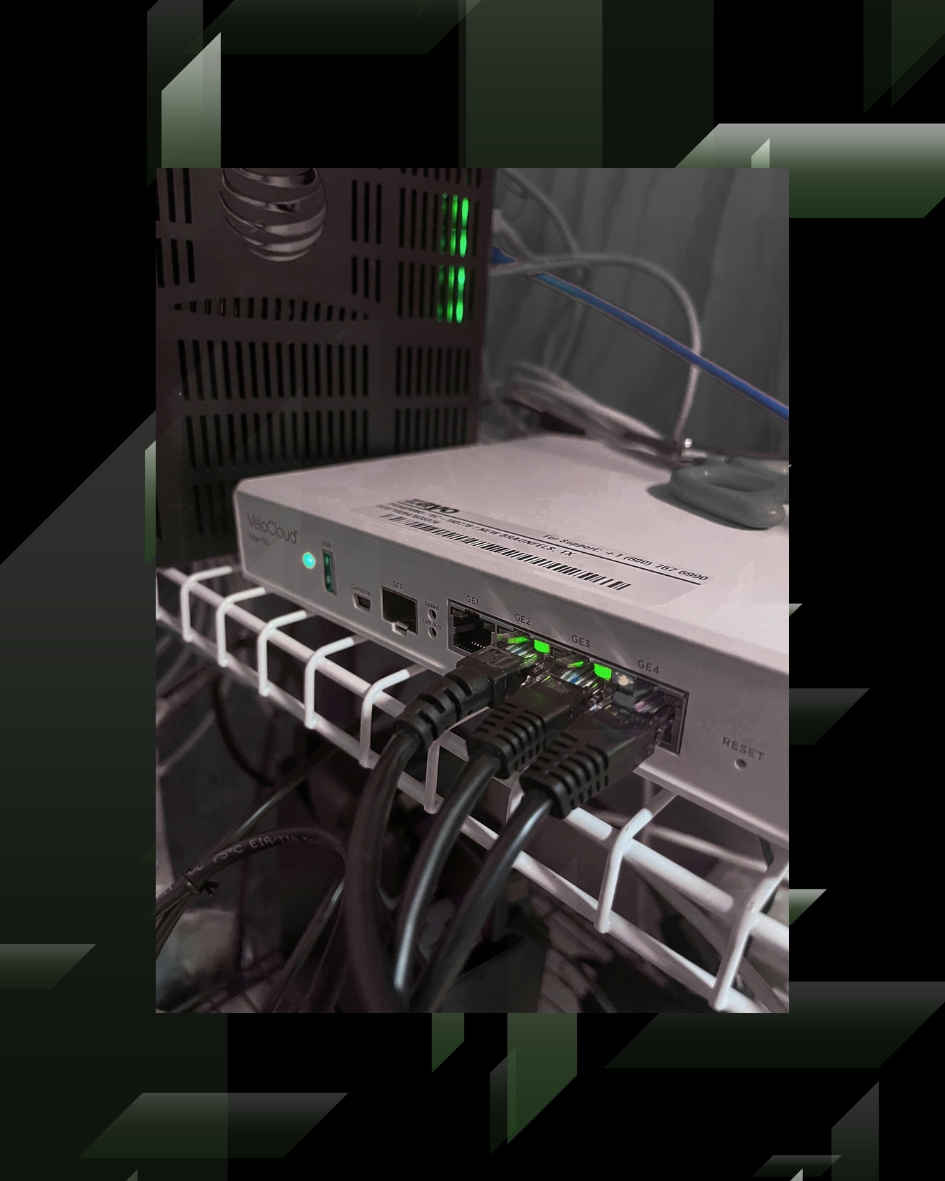
The Network Equipment Installation and Rack Organization project shows how a detailed installation can become a reusable site checklist. Client and site identifiers are omitted.
The work included equipment pickup, inventory, and installation of an SD-WAN edge device, managed power, a switch, cellular LTE, and a wireline connection. The technician followed defined port assignments, verified the SIM, moved LAN connections, labeled equipment, and tested primary and cellular connectivity with remote support.
Closeout required final photos, documentation, and detailed notes. The sequence becomes five stages: verify the kit, follow the layout, connect each port, validate both transports, and submit closeout.
The value is converting a complex scope into steps another qualified technician can follow at the next location.
10. Industry Case Study: Clarks Standardizes Its Multi-Site Network
A published Cisco Meraki case study shows how retailer Clarks standardized network upgrades across corporate and retail locations. Its team supported headquarters, regional offices, warehouses, and hundreds of stores, while legacy switch maintenance had become labor-intensive and costly.
Clarks selected a template-driven switching and SD-WAN approach to simplify installation and management. It reports Meraki switches deployed across 29 corporate locations and 180 retail stores, with MX appliances deployed to 330 retail outlets. It describes plans to equip 350 UK stores using the same configuration approach.
The measurable result was a 97 percent reduction in time required to update switches. Updating 127 legacy switches took 36 hours, while the standardized process required less than one hour of work.
The lesson for multi-site network upgrade planning is practical: shared templates, approved equipment, centralized visibility, and repeatable validation reduce manual effort across a distributed environment. Physical installation, cabling, labeling, and closeout standards remain essential for making the model dependable at every location.
Plan a Repeatable Multi-Site Rollout
Effective multi-site network upgrade planning turns individual dispatches into a controlled program. The organization gains a consistent equipment strategy, better site information, cleaner cabling, repeatable testing, and documentation that supports the next service call.
Granado Technologies can serve as a primary onsite vendor or responsive secondary partner. Support can include surveys, staging, installation, cutovers, testing, documentation, and follow-up work.
Ready to standardize your next network project? Contact Granado Technologies to plan a repeatable multi-site rollout.
Continue reading
 IT Infrastructure
 Warehouse Wi-Fi: Planning Around Racks, Aisles, and Mobile Devices
Warehouse Wi-Fi: Planning Around Racks, Aisles, and Mobile Devices Warehouse wifi planning connects wireless design to work on the floor. Scanners must remain connected from receiving through shipping.…
 IT Infrastructure
 Warehouse Network Infrastructure: How to Keep Scanners, Cameras, and WMS Connected
Warehouse Network Infrastructure: How to Keep Scanners, Cameras, and WMS Connected Warehouse network infrastructure affects nearly every connected workflow. Scanners need reliable Wi-Fi between aisles. Security cameras need…
 IT Infrastructure
 Industrial Security Camera Planning for Effective Coverage
Industrial Security Camera Planning for Effective Coverage Industrial security camera planning helps warehouses, logistics centers, and other industrial facilities improve visibility across fast-moving operations. Employees, forklifts, trucks, inventory,…
Need expert IT, networking, or low-voltage support?
Our team designs, deploys, and supports IT, structured cabling, Wi-Fi, security cameras, and audio-visual systems for businesses across all 50 states — backed by 24/7/365 service and BICSI-certified installers.