


Medical Office Renovation IT Infrastructure for Growth
Medical office renovation IT infrastructure planning is essential for dental, medical, and other small healthcare practices that are expanding or remodeling. A practice might add an operatory, move the front desk, expand imaging, or convert administrative space into treatment rooms. Those changes can improve workflow and patient access. Still, they also affect the technology behind daily operations. That includes network infrastructure, structured cabling, wireless coverage, security cameras, and the systems that store or move patient information. Med-Tech Construction’s 2026 guidance recommends planning for workflow, technology integration, patient privacy, and future growth before remodeling begins. This helps practices avoid costly changes later. Robins & Morton’s 2025 healthcare construction report notes that many health systems are moving services to offsite locations. It also highlights the growing need for flexible, connected infrastructure.
That matters because a renovation is not just a facilities project. In healthcare, construction and maintenance work can introduce patient safety risks if the space is not planned correctly. A CDC/CPWR hazard alert says healthcare facilities, including doctors’ offices, should perform an Infection Control Risk Assessment before construction begins so teams can isolate construction work from patient care areas. At the same time, HHS says large healthcare breaches have risen sharply in recent years, with more than 167 million individuals affected by large breaches in 2023. As a result, even a simple room move can become both an operational and security issue if IT planning starts too late. If you’re preparing for a renovation or expansion, our Technology Upgrades for Small Practices Planning Guide explains how to plan technology improvements alongside office growth.
Why IT Infrastructure Is Essential for Medical and Dental Practices
When a medical or dental office changes its layout, the technology layout changes too. A workstation may move farther from an existing data drop. A new treatment room may need additional ports, switch capacity, and better cable pathways. An imaging system may need more bandwidth than the original room design anticipated. Even a front-desk relocation can change where phones, payment terminals, printers, badge readers, and surveillance views need to be placed. BICSI’s healthcare ICT guidance covers wireless LANs, physical cabling, security systems, and information security. Together, these recommendations show how closely connected modern clinical technology has become.
How Office Renovations Affect IT Infrastructure
Healthcare construction specialists are making the same point from a different angle. Med-Tech Construction advises growing practices to assess current layout, workflows, legal requirements, space allocation, and future growth before remodeling. It also recommends confirming that electrical and data infrastructure can support expansion. In other words, if the room plan changes but the network plan does not, the practice often inherits expensive follow-up work after the remodel looks “finished.”
This is also why small adjustments can create larger bottlenecks. Robins & Morton’s 2025 report says healthcare buildings are becoming more connected, with more devices, more automation, and more operational systems relying on shared infrastructure. The report also says planning and infrastructure will need to support robotics, automated vehicles, AI, and other connected tools as healthcare processes change. Small practices may not be deploying robotics tomorrow, but they are adding more connected equipment, cloud applications, and security devices than they used to. That trend makes early IT planning more important, not less. Even small office changes can have a significant impact on connectivity and device performance. Learn more in our guide on Room Changes Affect IT Infrastructure: Key Considerations.
Medical Office Renovation IT Infrastructure: Network Planning
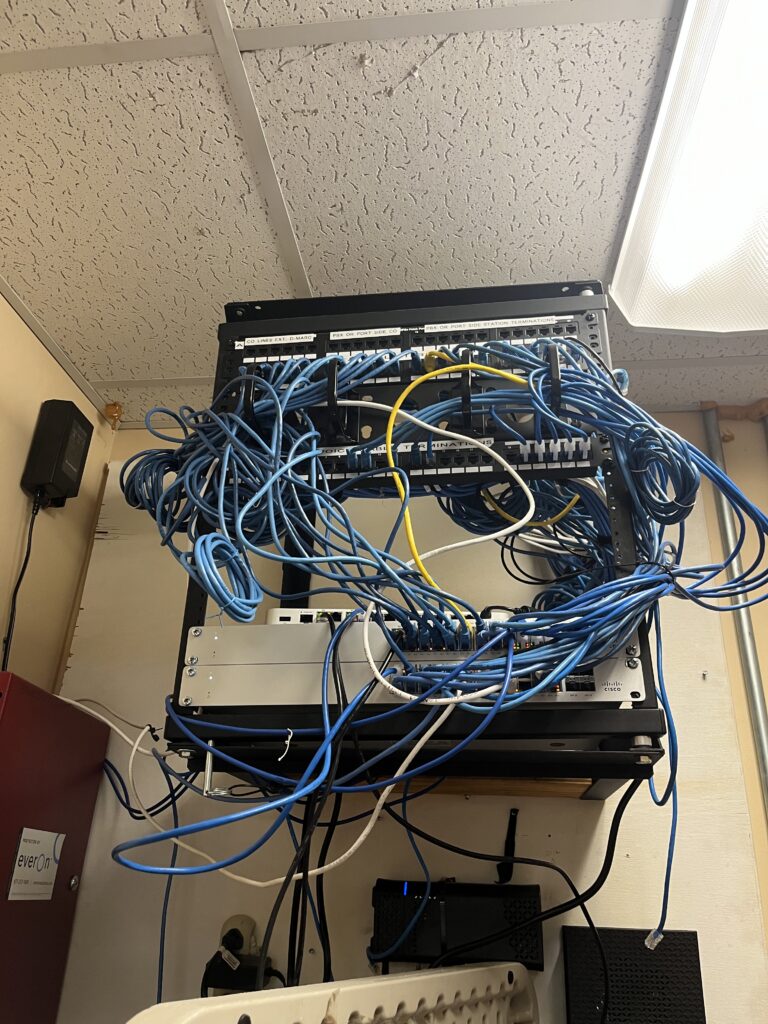
Structured cabling is easy to ignore until a remodel is underway. Medical office renovation IT infrastructure planning should always begin with the network because every connected system depends on reliable connectivity. Yet it is the foundation for almost every connected system in a practice. BICSI’s healthcare best-practice material emphasizes standards-based design for cabling, wireless systems, facility considerations, infection control during construction, and the integration of safety and communication systems. It also highlights the importance of telecom spaces and sizing guidelines as healthcare technology changes and rooms are reconfigured. That directly supports a practical rule for small practices: if you are opening walls, moving chairs, or adding devices, review your cabling plan before the contractor closes anything back up. Planning ahead also helps practices avoid many of the network infrastructure problems that disrupt daily operations and patient care.
 Medical Office Renovation IT Infrastructure and Structured Cabling
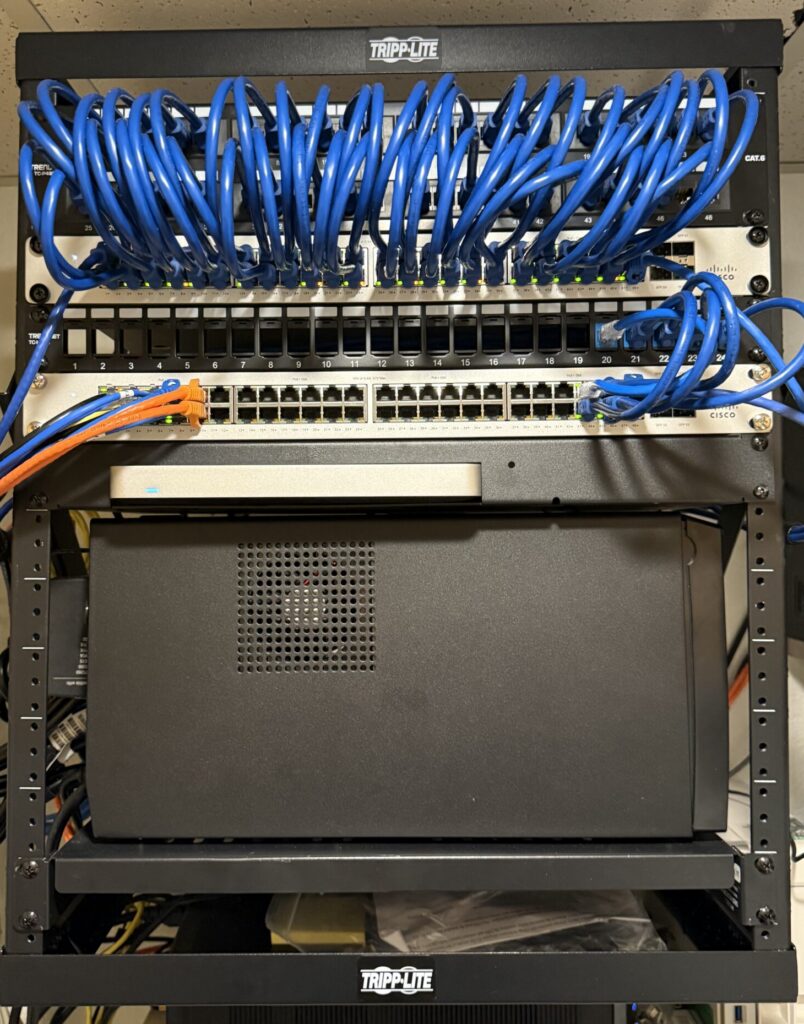
The need is even clearer when practices start adding wireless devices and PoE-powered equipment. Reliable medical office renovation IT infrastructure also depends on structured cabling that supports today’s technology and future expansion. Panduit’s UC Davis Health case study highlights growing demand for Wi-Fi applications and Power over Ethernet. The organization also stayed aligned with healthcare standards and policies. The health system moved from lower cabling performance to Category 6A so it could support wireless upgrades, PoE++, and a broader range of connected devices. The same case study notes that field-term plugs supported access points and security cameras. It also emphasizes careful telecom room planning as infrastructure density increases.
Why Structured Cabling Should Be Planned Before Construction
Small practices will not have UC Davis scale, but they face the same design question in miniature: can the network and cabling support what the renovated office is about to add?
 How Reliable Network Infrastructure Improves Patient Care
Wireless coverage also changes when the physical office changes. New walls, cabinetry, imaging equipment, and furniture can alter signal behavior. That means a layout that worked before a renovation may no longer perform the same way after one. Instead of assuming the internet circuit is the problem, practices should verify whether access point placement still matches the new room design and device density. This reduces troubleshooting later and helps staff rely on stable wireless connections from opening day.
Security Cameras for Medical Office Renovation IT Infrastructure
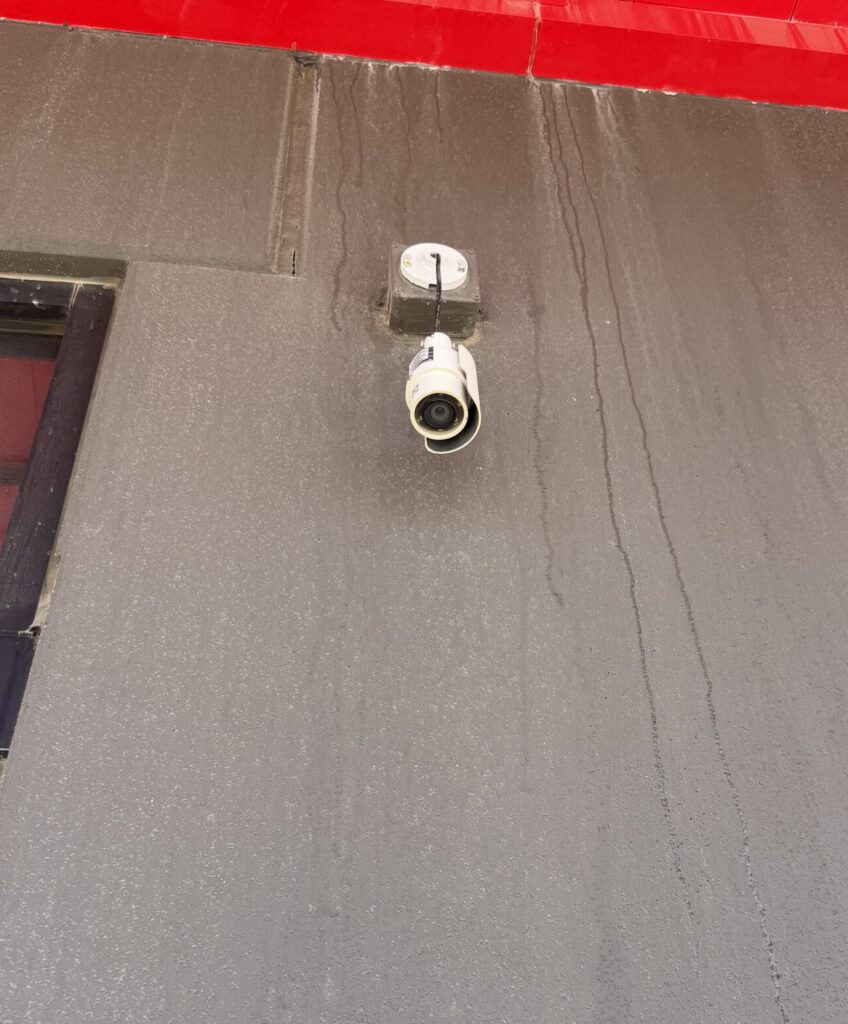 Review security cameras whenever a practice changes entrances, hallways, waiting areas, medication storage, or staff work zones. Manufacturers consistently frame camera selection around blind-spot reduction, entry and exit visibility, and wide-area coverage. Avigilon, for example, markets cameras specifically for entry and exit points, intersections, and other locations prone to blind spots, while Axis promotes panoramic cameras for broad coverage with fewer blind spots. That does not mean every practice needs new hardware during a remodel. However, it does mean camera placement should be part of the project checklist, especially if traffic patterns or sensitive spaces are changing.
Why Security Cameras Should Be Reviewed During Office Renovations
Physical changes also affect data security. Robins & Morton’s healthcare report says the growing number of devices in modern facilities expands the attack surface. It adds that healthcare remains a prime target for cyberattacks and that early information systems expertise should be incorporated into the design process. The report also highlights practical controls such as securing server-room access and ensuring workers on building automation and security-access systems understand cybersecurity protocols. For a small practice, that translates into a straightforward step: treat network closets, low-voltage rooms, and access-controlled spaces as part of renovation planning, not as an afterthought once furniture arrives.
Healthcare Example: Planning IT Infrastructure During a Medical Office Expansion
A helpful small-practice example comes from Med-Tech Construction’s 2026 article on remodeling growing medical practices in Texas. This example shows why medical office renovation IT infrastructure planning should begin before construction rather than after renovations are complete. The article recommends redesigning with patient privacy, workflow, accessibility, and future growth in mind. It also calls for careful planning around advanced technology, secure platforms, and the electrical and data infrastructure needed to scale. That is a useful model for dental offices, specialty clinics, and other smaller practices because it connects room design to operational performance, instead of treating technology as a separate project.
A Practical Example for a Growing Dental Practice
A dental office can apply the same logic. Imagine a practice converting two business offices into operatories. The carpentry may stay on schedule. The chairs may arrive on time. But if the original layout did not plan for extra data drops, higher wireless demand, more imaging traffic, new camera views, and secure access to supporting systems, the practice may reopen with avoidable gaps. The lesson is simple. Renovation drawings and infrastructure drawings should inform each other from the start. That principle aligns with the broader healthcare construction trend toward flexibility and adaptable information infrastructure in connected care environments.
Onsite Medical Office Renovation IT Infrastructure Support
Construction teams know construction. Equipment vendors know equipment. However, someone still needs to connect the physical plan to the network plan. That is where onsite IT infrastructure support becomes valuable. The goal is not to overcomplicate a remodel. The goal is to verify cable pathways and confirm the switching environment can support additional devices. It also includes reviewing access point placement, checking security camera coverage, and documenting any equipment that must be relocated before patients return. This approach fits the collaborative model highlighted by BICSI’s healthcare standards and by healthcare construction guidance that stresses early planning, resilience, and safer implementation. If you’re unsure when professional assistance is needed, our article on When Should a Medical or Dental Practice Bring in Onsite IT Support? explains the signs to look for before and during a renovation.
Preventing Downtime Before Your Practice Reopens
It also helps small practices avoid the most frustrating version of a renovation: the office looks done, but core systems still need emergency fixes. That might mean temporary cabling in hallways, cameras pointed at the wrong areas, slow wireless in treatment rooms, or unplanned visits to relocate hardware after reopening. In a clinical setting, those delays affect staff confidence and patient experience quickly. A short pre-construction infrastructure review is often less disruptive than post-construction troubleshooting. Addressing small technology concerns early can prevent larger disruptions later. Read about the 5 IT Issues Small Medical and Dental Offices Should Catch Early to help your practice stay ahead of common problems.
Plan IT Infrastructure Before Your Next Medical Office Renovation
The best time to plan network infrastructure is before crews move walls, not after staff notice slow connections. Successful medical office renovation IT infrastructure planning helps practices reduce downtime, improve reliability, and prepare for future growth. Likewise, review structured cabling before ceilings close up instead of waiting until a new operatory opens. Finally, reassess security cameras whenever the office layout changes to eliminate potential blind spots. For medical, dental, and small practices, renovation planning works best when physical design and IT infrastructure move together. That approach supports patient care, reduces rework, and helps practices adapt to future technology with less disruption.
If your practice is planning a remodel, equipment move, or room conversion, schedule an IT infrastructure review before construction begins. A simple assessment of cabling, wireless, cameras, and support spaces can prevent much larger issues later. For additional ways to reduce downtime and keep your technology running efficiently, explore our guide on Removing IT Bottlenecks with Quick IT Field Services. Investing in medical office renovation IT infrastructure before construction begins can help your practice avoid unnecessary disruptions and costly rework.
Continue reading
 IT Infrastructure
 Industrial Security Camera Planning for Effective Coverage
Industrial Security Camera Planning for Effective Coverage Industrial security camera planning helps warehouses, logistics centers, and other industrial facilities improve visibility across fast-moving operations. Employees, forklifts, trucks, inventory,…
 IT Infrastructure
 Wireless Coverage Problems: Causes and Solutions
Wireless Coverage Problems: Causes and Solutions Wireless coverage problems can significantly disrupt industrial operations, even when they begin as minor connectivity issues. Warehouses, manufacturing facilities, distribution centers, and…
 IT Infrastructure
 Room Changes Affect IT Infrastructure: Key Considerations
Room Changes Affect IT Infrastructure: Key Considerations Healthcare providers, dental offices, and small practices constantly evolve. A practice may add another treatment room, relocate the front desk, expand…
Need expert IT, networking, or low-voltage support?
Our team designs, deploys, and supports IT, structured cabling, Wi-Fi, security cameras, and audio-visual systems for businesses across all 50 states — backed by 24/7/365 service and BICSI-certified installers.