


The Hidden Infrastructure Issues That Delay Warehouse and Manufacturing Technology Projects
New technology projects can move quickly in planning, then slow down fast once work starts onsite. A new scanner rollout, wireless upgrade, camera installation, access control project, or network refresh may look simple on paper. But once teams get into the warehouse or manufacturing floor, hidden infrastructure issues can create delays.
In manufacturing, transportation and logistics, and warehousing and distribution, technology depends on the physical environment. Cable pathways, network racks, power, wireless coverage, access points, cameras, badge readers, and documentation all affect how smoothly a project moves. When these items are not ready, internal IT teams and vendors can lose valuable time.
This guide explains the hidden infrastructure issues that often delay warehouse and manufacturing technology projects. It also explains how structured cabling, network deployments, access control, and onsite IT support help keep projects on track. Granado Technologies supports industrial teams with responsive IT infrastructure and field services, helping internal IT teams and existing vendors avoid becoming bottlenecks.
For a broader look at how fast field services reduce operational slowdowns, read our pillar guide on Removing IT Bottlenecks with Quick IT Field Services.
Why hidden infrastructure issues matter

Technology projects rarely fail because of one big issue. More often, delays come from small problems that were not found early enough.
A cable path is blocked. A network closet does not have enough space. A switch is out of ports. Wireless coverage does not reach a new work zone. A camera mount does not have power nearby. A badge reader needs cabling that was not included in the original plan.
Each issue may seem minor at first. Together, they can slow down a rollout, push back deadlines, and create frustration between IT, operations, facilities, and vendors.
This is why physical IT infrastructure needs to be reviewed before a technology project starts. Good planning does not just make the project look organized. It helps reduce downtime, avoid rework, and make the handoff cleaner.
1. Poor or outdated structured cabling
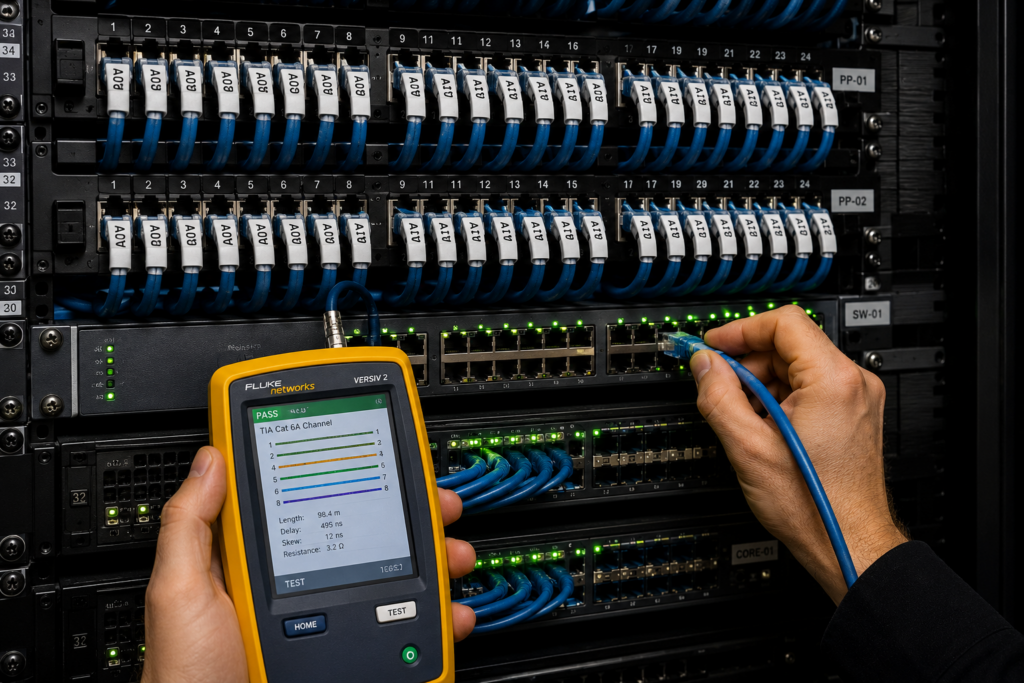
Structured cabling is one of the most common causes of project delays. Warehouses and manufacturing facilities often change over time. New lines are added. Racks move. Workstations shift. Cameras, scanners, and access points get added wherever there is a need.
Over time, cabling can become hard to follow. Labels may be missing. Patch panels may not match documentation. Old runs may still be in place. Some drops may not be tested or may not support the performance needed for newer systems.
When a project starts and the cabling is unclear, technicians lose time tracing lines, testing drops, and fixing problems that should have been identified earlier. A scanner rollout, camera upgrade, or access control project can quickly get delayed because the cabling foundation is not ready.
The best approach is to review Structured Data Cabling early, including cable pathways, labels, terminations, patch panels, and test results before installation day. You can also review The Data Cabling Guide for more background on cabling basics, planning, and common installation issues.
2. Network closets that are not ready
Network closets, IDFs, and MDFs are often overlooked during project planning. But these spaces can make or break a technology rollout.
A network closet may look ready until the team checks the details. There may not be enough rack space. Power may be limited. Cooling may be poor. Cable management may be messy. Switches may not have enough available ports. PoE capacity may not support new cameras, wireless access points, or badge readers.
These issues matter because many warehouse and manufacturing technology projects rely on network equipment being ready. A new access point needs switch capacity and power. A camera may need PoE. A badge reader or controller may need a clean network connection. If the network closet is not ready, the project slows down.
Before a deployment begins, inspect the closet. Check power, space, ports, cable management, labels, and documentation. This step helps make network deployments smoother and reduces last-minute surprises.
3. Missing documentation
Documentation is one of the easiest things to ignore, but one of the most important things to have. When documentation is missing, every task takes longer.
Internal IT teams may not know which switch port supports a device. Facilities may not know where a cable pathway runs. A vendor may not know where to mount equipment. Technicians may need to test and trace connections before they can even begin the planned work.
Good documentation should include cable labels, rack layouts, patch panel records, device locations, switch ports, IP information, photos, test results, and as-built notes. It does not have to be complicated, but it does need to be accurate and easy to use.
Documentation becomes even more important for multi-site operations. If every warehouse or plant has a different format, support becomes harder. A consistent documentation process helps teams move faster and support multiple locations more easily.
For more on this, see our guide on Standardize IT Infrastructure Across Multiple Locations.
4. Wireless coverage gaps
Many warehouse and manufacturing projects depend on wireless connectivity. Handheld scanners, tablets, mobile printers, AGVs, and warehouse management systems all need reliable coverage.
The problem is that wireless conditions can change over time. New racking, inventory changes, metal equipment, forklifts, and layout changes can affect signal strength and roaming. A space that worked well last year may not support a new workflow today.
Wireless issues often show up late in the project. Devices connect in one area but drop in another. Scanners work near the office but fail near the dock doors. Access points are installed, but placement does not match the real environment.
A wireless review should happen before major technology rollouts. This may include a site survey, coverage review, AP placement check, and validation testing. Our article on Warehouse Wireless Design, From Site Survey to Validation explains how to approach this more carefully.
5. Access control added too late
Access control is often treated as a separate security project. In reality, it depends on the same physical IT infrastructure as many other systems.
Badge readers, door controllers, cameras, request-to-exit devices, and monitoring systems need cabling, power, network connectivity, and proper testing. If access control is added late, teams may find that cable pathways are missing, network ports are unavailable, or power was not planned correctly.
This can delay go-live, especially in warehouses and manufacturing facilities with multiple entrances, dock doors, restricted areas, and shift changes.
Access control should be included in the infrastructure plan from the start. It should be coordinated with structured cabling, network deployments, cameras, and onsite IT support. For more detail, read Access Control Best Practices for Manufacturing and Warehouse Facilities.
6. Unclear vendor responsibilities
Many technology projects involve several teams. Internal IT may own the network. A cabling vendor may handle physical runs. A security vendor may handle cameras and access control. Operations may control access to production areas. Facilities may manage lifts, power, and building access.
If roles are not clear, delays happen. One vendor may wait on another. Internal IT may get pulled into tasks that were not planned. A small field issue may sit unresolved because no one knows who owns it.
Before work starts, define responsibilities clearly. Decide who owns cabling, network configuration, device installation, testing, documentation, and final signoff. A responsive IT infrastructure and field services partner can help close those gaps onsite.
For more on how communication gaps create cost and delays, read The hidden cost of poor IT communication and how it impacts your bottom line.
7. No plan for onsite support
Some projects are planned remotely, but still need hands-on work to succeed. Someone has to test cable drops, mount equipment, adjust access points, check badge readers, trace connections, and confirm that devices work in the real environment.
That is where onsite IT support becomes valuable. A responsive onsite team can handle the physical tasks that internal IT teams may not have time to manage. This is especially useful when internal teams support multiple sites or need to stay focused on larger systems and business priorities.
Onsite support can also help after go-live. If a device fails, a camera needs adjustment, or a scanner area loses connectivity, a field team can respond quickly and document the fix.
Granado Technologies provides responsive IT infrastructure services for industrial teams, including structured cabling, network deployments, access control, cameras, wireless support, and onsite IT support.
To learn more about how onsite support helps projects move faster, read Onsite IT: The Benefits of Field Support
8. Not planning for future growth
A project may solve today’s problem but create tomorrow’s bottleneck if growth is not considered.
A new switch may support current devices but leave no room for expansion. A cable pathway may work for one camera but not future coverage. A rack may be organized today but have no space for the next upgrade. An access control design may work at one site but not scale across multiple locations.
IT managers and infrastructure managers should plan for future growth when possible. This includes spare ports, extra rack space, clean cable management, clear documentation, and standards that can be repeated across sites.
Planning for growth helps reduce rework and makes future projects easier.
A useful case study on low-voltage project planning
A helpful example of infrastructure planning in action is Exact IT Consulting’s low-voltage cabling case study. The case study highlights how low-voltage work can support broader technology projects when cabling, planning, and installation are handled carefully. It is a useful reminder that technology projects depend on strong physical infrastructure, not just software or devices.
You can review the case study here: Low Voltage Cabling Case Study.
For warehouse and manufacturing teams, the lesson is clear. Hidden infrastructure issues are easier to solve when they are found early, documented clearly, and handled by teams that understand field execution.
How to prevent delays before they happen
The best way to prevent delays is to review the physical environment before the project starts. Walk the site. Check cabling. Inspect network closets. Confirm wireless coverage. Review access control needs. Identify power requirements. Document what already exists.

Then build the project plan around the real site conditions, not assumptions.
A good plan should answer simple questions. What needs to be installed? Where will it go? What cabling is required? What network equipment is needed? Who owns each task? How will the work be tested? What documentation will be delivered at the end?
This process helps internal IT, operations, facilities, and vendors work from the same plan.
Final thoughts
Warehouse and manufacturing technology projects often get delayed by hidden infrastructure issues. Poor structured cabling, missing documentation, limited switch capacity, weak wireless coverage, late access control planning, and unclear vendor ownership can all slow progress.
The good news is that many of these problems can be avoided with early planning and responsive field support. When infrastructure is reviewed, documented, and coordinated before work begins, projects move faster and create fewer surprises.
At Granado Technologies, we work with manufacturing, transportation and logistics, and warehousing and distribution teams to provide fast, reliable IT infrastructure and field services. Our team supports structured cabling, network deployments, access control, cameras, wireless, and onsite IT support so internal IT teams and existing vendors do not become bottlenecks.
If you are planning a warehouse or manufacturing technology project, contact us. We would be glad to help you talk through the next step.
Author and credentials
By Granado Technologies Team
Granado Technologies delivers onsite IT support, structured cabling, network deployments, and access control for manufacturing, warehousing, and logistics sites. Our team includes certified network engineers and field technicians with experience in single-site and multi-site rollouts.
Continue reading
 Data Cabling
 Why Structured Cabling for Warehouses Matters in Expanding Industrial Facilities
Structured Cabling for Warehouses: Essential Tips for Growth Structured cabling for warehouses becomes especially important when an industrial facility adds more employees, equipment, storage areas, production lines, cameras,…
 IT Infrastructure
 Industrial Security Camera Planning for Effective Coverage
Industrial Security Camera Planning for Effective Coverage Industrial security camera planning helps warehouses, logistics centers, and other industrial facilities improve visibility across fast-moving operations. Employees, forklifts, trucks, inventory,…
 IT Infrastructure
 Wireless Coverage Problems: Causes and Solutions
Wireless Coverage Problems: Causes and Solutions Wireless coverage problems can significantly disrupt industrial operations, even when they begin as minor connectivity issues. Warehouses, manufacturing facilities, distribution centers, and…
Need expert IT, networking, or low-voltage support?
Our team designs, deploys, and supports IT, structured cabling, Wi-Fi, security cameras, and audio-visual systems for businesses across all 50 states — backed by 24/7/365 service and BICSI-certified installers.